Home security has become a top priority for individuals and families alike. In today’s digital age, ensuring your loved ones and property are safe has never been easier, thanks to advancements in technology. The VicoHome security camera app is a reliable solution that empowers you to monitor your home remotely with ease. This article delves into the features of the app and provides a step-by-step guide to installing it on Android, iOS, and PC (Windows & Mac).
What is the VicoHome App?
The VicoHome security camera App is an intuitive application designed to pair seamlessly with VicoHome security cameras. This app offers advanced monitoring capabilities, real-time notifications, and intelligent alerts, allowing you to maintain control over your home security anytime, anywhere. Whether you're at work, traveling, or just lounging at home, VicoHome ensures you're always connected to what matters most.
The app offers a suite of innovative features tailored to enhance your security experience:
1. HD Video Quality
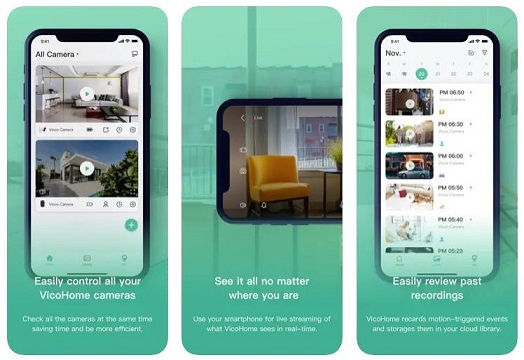
VicoHome cameras deliver crystal-clear HD video, ensuring you don’t miss a single detail. The app supports high-resolution streaming and playback, giving you clear footage even in low-light conditions.
2. Real-Time Alerts
Receive instant notifications on your smartphone whenever motion is detected. The AI-powered motion detection system minimizes false alarms, such as those triggered by pets or shifting shadows.
3. Two-Way Audio
Communicate with anyone at your doorstep through the app's two-way audio feature. Whether it's a delivery person or a visitor, you can interact seamlessly.
4. Cloud Storage & Local Backup
VicoHome offers flexible storage options. Store your recordings securely in the cloud or use local storage via an SD card. Cloud storage ensures footage is accessible even if the camera is tampered with.
5. Multi-Device Access
Access your camera feeds from multiple devices, including smartphones, tablets, and PCs. The app supports simultaneous viewing, so every family member can stay informed.
6. Smart Integration
The app integrates with smart home devices such as Alexa and Google Assistant, allowing voice commands for live feed access and other controls.
7. Customizable Zones
Set up specific monitoring zones to focus on high-risk areas, such as your front door or garage, and reduce unnecessary alerts.
The VicoHome security App is compatible with Android devices and can be installed in a few simple steps:
Step 1: Download the App
Open the Google Play Store on your Android device.
In the search bar, type “VicoHome App” and press enter.
Look for the official app developed by VicoHome and tap Install.
Step 2: Launch the App
Once installed, open the app by tapping on its icon.
Grant the necessary permissions, such as access to the camera, microphone, and storage.
Step 3: Create or Log into Your Account
If you're a new user, click on Sign Up to create an account. Provide your email address and set a strong password.
Existing users can simply log in with their credentials.
Step 4: Pair Your Camera
Follow the in-app instructions to connect your VicoHome security camera to the app.
Ensure your camera is powered on and connected to the same Wi-Fi network as your device.
For iPhone and iPad users, the installation process is just as straightforward:
Step 1: Download the App
Open the App Store on your iOS device.
Search for “VicoHome App”.
Tap Get and authenticate your download using Face ID, Touch ID, or your Apple ID password.
Step 2: Open the App
Once the app is downloaded, tap the icon to open it.
Allow necessary permissions for optimal functionality.
Step 3: Set Up Your Account
Sign up with your email address if you're a new user.
Log in if you already have an account.
Step 4: Connect Your Camera
Use the app's setup wizard to link your VicoHome camera to your home Wi-Fi network.
Once connected, you can start monitoring your home directly from your iOS device.
Also Read: Get security camera app on your Chomebook device
Although the VicoHome app is primarily designed for mobile devices, you can still access it on your PC using an Android emulator. Here’s how:
Step 1: Download an Android Emulator
Choose a reliable Android emulator such as BlueStacks or NoxPlayer.
Visit the official website of your chosen emulator and download the installer.
Step 2: Install the Emulator
Run the installer and follow the on-screen instructions to install the emulator on your PC.
Once installed, launch the emulator.
Step 3: Log into Google Play Store
Inside the emulator, open the Google Play Store.
Log in using your Google account.
Step 4: Download the VicoHome App
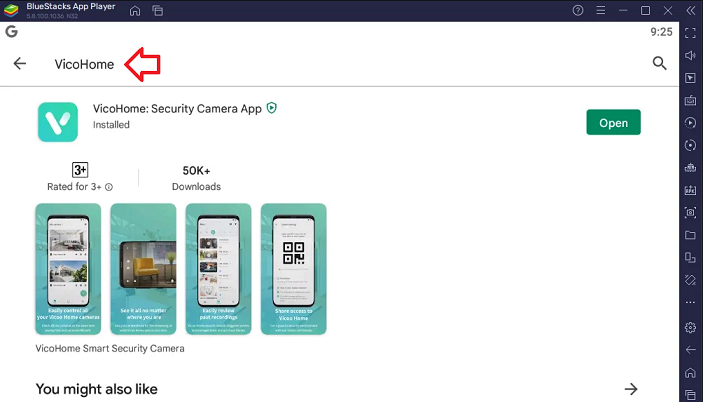
Search for “VicoHome App” in the Play Store.
Click Install to download the app onto the emulator.
Step 5: Launch the App
Open the app within the emulator.
Log in with your VicoHome credentials and access your camera feeds.
Must Read: How to use VicoHome AI Bird Feeder?
Update Regularly: Ensure your app and camera firmware are always up to date to access the latest features and security patches.
Secure Your Network: Use a strong Wi-Fi password to protect your camera feeds from unauthorized access.
Position Cameras Strategically: Install your cameras in areas with a clear line of sight for optimal coverage.
Customize Settings: Adjust sensitivity levels and notification preferences to suit your specific needs.
The VicoHome App stands out for its ease of use, robust security features, and seamless integration with modern smart home ecosystems. Its ability to provide real-time updates, intelligent alerts, and high-quality video ensures peace of mind for users. Moreover, the app’s compatibility across multiple platforms makes it a versatile choice for diverse households.
Conclusion
The VicoHome App is an indispensable tool for enhancing home security. Its advanced features, combined with the flexibility to access it on Android, iOS, and PC devices, make it a go-to choice for anyone seeking reliable home monitoring. By following the installation steps outlined above, you can quickly set up the app and start enjoying the benefits of a secure home environment.
Take the first step toward safeguarding your home today with the VicoHome security camera app!